جهز حملة وأرسلها
اختر فلاتر العملاء الفعلية وعاين رسالة معتمدة ثم أرسل أو جدول وراجع التسليم.
- 1
جهز الجمهور والقالب
اربط واتساب وتأكد من رقم المرسل واعتماد القالب ولغته. افتح الحملات وابدأ حملة. راجع الحدود والصلاحيات الظاهرة لباقتك الحالية؛ وصف الباقة المجانية القديم لا يمثل الباقات المدفوعة الحالية. رسوم رسائل ميتا مستقلة.
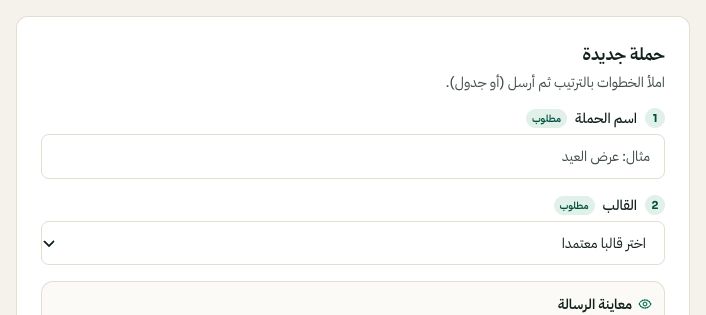
ابدأ الحملة بالاسم والقالب المعتمد. قد تختلف الخيارات المتاحة والقيم المحفوظة حسب إعدادات حسابك. اضغط الصورة للتكبير. - 2
حدد المستلمين وراجعهم
اختر شريحة أو شروطا متقدمة مثل منتج تم شراؤه أو المدة منذ آخر شراء. تعتمد النتائج على بيانات المتجر المتزامنة فراجع المزامنة أولا. افحص عدد الجمهور وعينة من العملاء. استيراد الرقم ليس موافقة تسويقية؛ يستبعد الملغون اشتراكهم من إرسال الحملات.
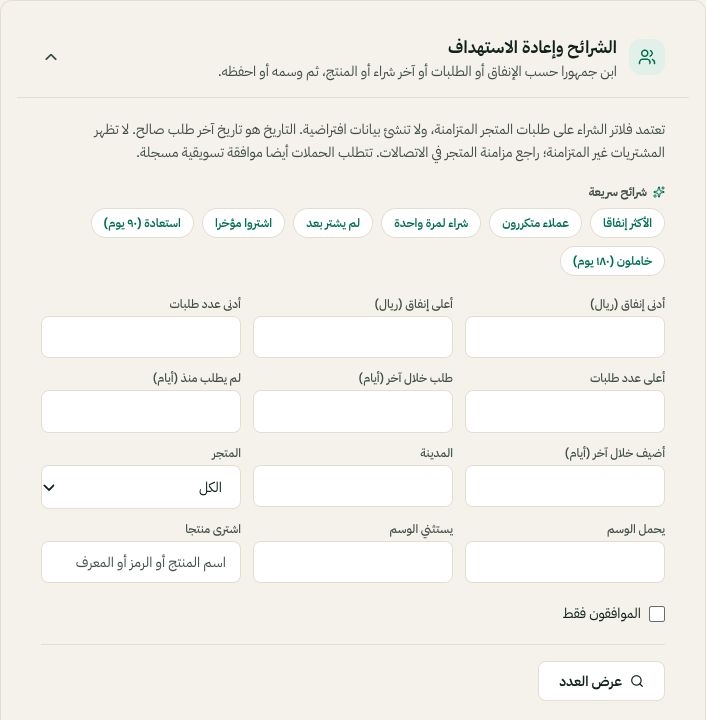
قواعد الجمهور تستخدم فلاتر الشراء وتاريخ الطلب والمنتج والموافقة. قد تختلف الخيارات المتاحة والقيم المحفوظة حسب إعدادات حسابك. اضغط الصورة للتكبير. - 3
عاين ثم أرسل أو جدول
اختر القالب المعتمد واللغة والمرسل وقيم المتغيرات. راجع المعاينة النهائية وأي مرفق. أرسل الآن أو اختر الجدولة وتحقق من التاريخ والوقت المعروضين. الإرسال يتواصل مع عملاء فعليين؛ جرب جمهورا صغيرا من حساباتك التجريبية قبل أول حملة فعلية.
- 4
راجع سجل الحملة
راجع حالات التسليم والفشل في سجل الحملة. يمكن إلغاء الحملة المجدولة قبل إرسالها. إذا لم تتضح النتيجة فتحقق من المحاولة الأصلية ولا تنشئ حملة مكررة. تخضع الطلبات والإيرادات لقواعد الإسناد في التقرير ولا تثبت وحدها أن الحملة سببت الشراء.