استورد عملاءك
ألصق جهات الاتصال أو ارفع CSV؛ واستخدم الاستيراد الذكي المستقل لملفات Excel وPDF.
- 1
افتح العملاء ← استيراد
اختر استيراد جهات اتصال ثم لصق أو رفع CSV. نزل النموذج للاسم والجوال والبريد والمدينة والوسوم، واستخدم الجوال بالصيغة الدولية. لملفات Excel وPDF استخدم رابط الاستيراد الذكي المستقل في العملاء وراجع البيانات المستخرجة قبل الاستيراد. تصل بيانات عملاء المتجر عبر المزامنة؛ استيراد الملف لا ينشئ سجل مشتريات افتراضيا.
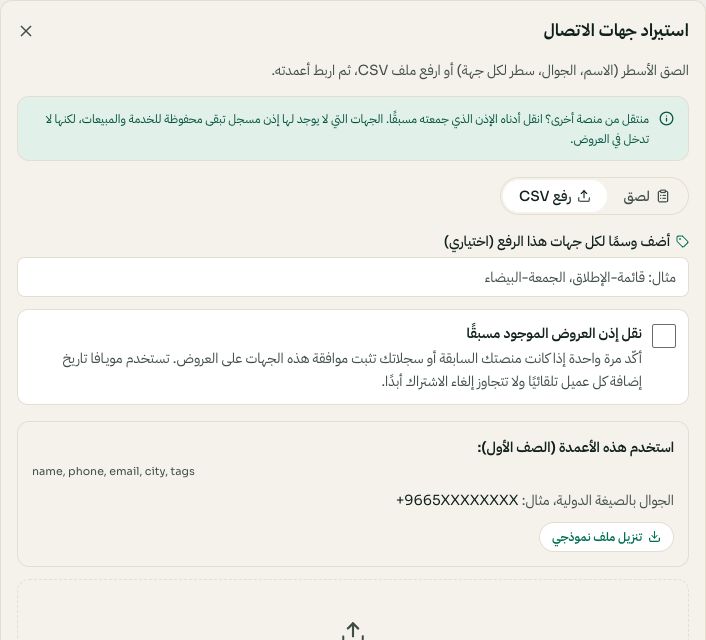
استيراد CSV وتأكيد الموافقة الموجودة قبل الرفع. قد تختلف الخيارات المتاحة والقيم المحفوظة حسب إعدادات حسابك. اضغط الصورة للتكبير. - 2
طابق الأعمدة
طابق الاسم والجوال والبريد والمدينة والوسوم. الأرقام غير الصالحة تتجاهل ويتحسب عددها عشان تعرف بالضبط وش دخل.
- 3
وسم أثناء الاستيراد
الوسوم هي اللي بتستهدف فيها لاحقا، «الرياض»، «جملة»، «العيد-2026». أضف وسم المجموعة أثناء الاستيراد لتجد العملاء لاحقا. وتبقى أهلية الحملات مرتبطة بإذن تسويقي مسجل.
- 4
احترم الموافقة
راسل بس العملاء اللي وافقوا. واستيراد الرقم ما يعني موافقة، راجع الحالة في مركز الامتثال قبل ما ترسل.