Configure order reviews and support ratings
Choose a delivery event and delay for reviews, and a separate template for support feedback.
- 1
Set up order review requests
In Message templates → Review requests, select an approved template and language, the delivered status from your platform and a delay. Review quiet hours and optional coupon settings if used. Enable and save. Verify your store actually sends the selected delivered status.
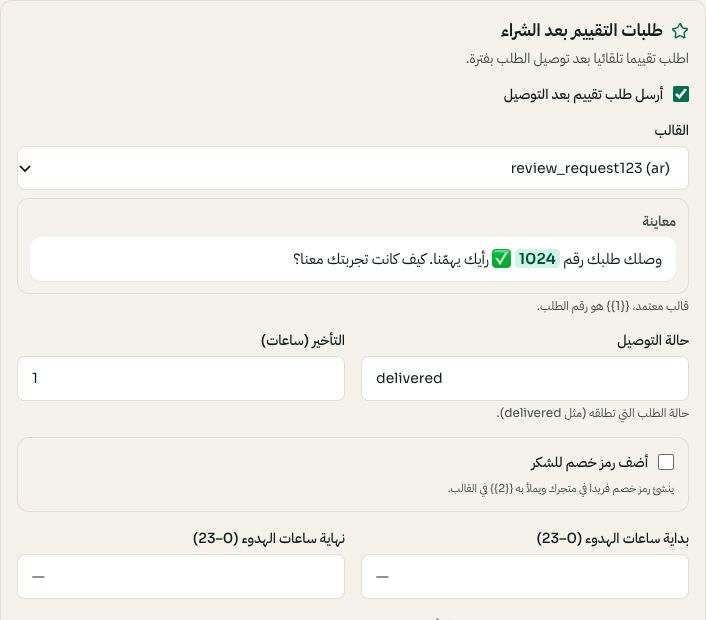
Review requests: delivery status, template, delay and quiet hours; 1024 is a preview value. Arabic interface shown; use the corresponding labels in your chosen language. Your available options and saved values may differ. Open the image to enlarge. - 2
Set up support rating separately
Open Support rating, choose the approved rating template and enable it. Read the on-screen collection instructions: customer replies are used for the rating; do not assume a survey URL is generated. A template with an unrelated URL is not a substitute for the rating reply.
- 3
Test once and inspect the result
Use a controlled order/conversation, confirm the trigger and delayed send, then inspect the recorded response in reports. Keep order feedback and support feedback distinct. A missing delivery event, unapproved template or disconnected number can prevent sending.