اربط متجر زد
فوض ربط زد ثم زامن الطلبات والمنتجات والعملاء مع مويافا.
- 1
افتح الإعدادات ← زد
في مويافا، افتح الإعدادات ← زد واضغط «ربط زد». الربط للمالك أو المشرف فقط.
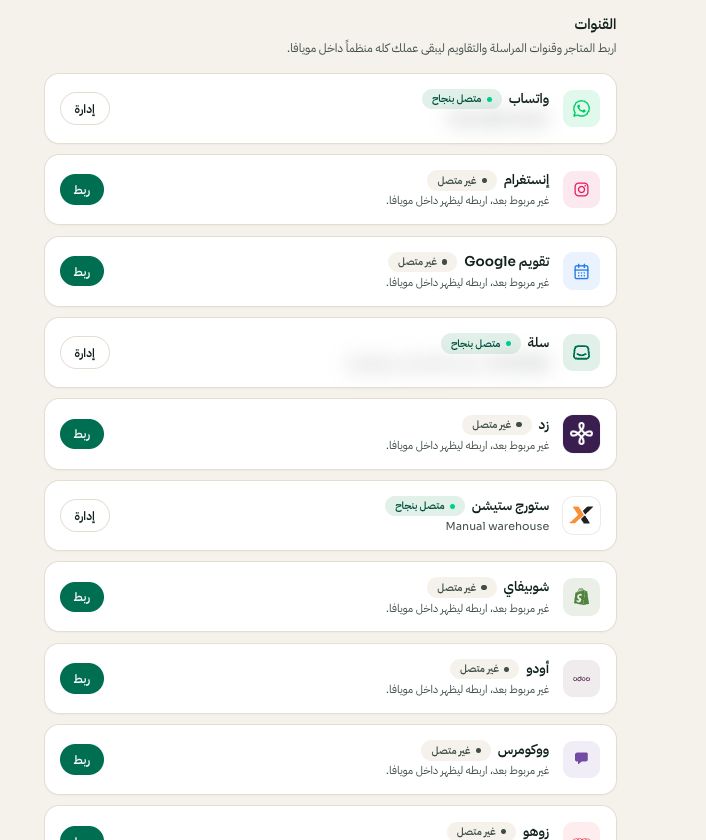
الإعدادات ← القنوات: اختر المنصة ثم ربط أو إدارة. قد تختلف الخيارات المتاحة والقيم المحفوظة حسب إعدادات حسابك. اضغط الصورة للتكبير. - 2
صرح في زد
تنتقل لشاشة التصريح في زد. سجل دخولك إذا لزم ووافق على مويافا. ترجع تلقائيا وتتحفظ رموز الوصول مشفرة.
- 3
تأكد من المزامنة
الطلبات والمنتجات توصل لنفس مساحة العمل مع تحديثات لحظية. أعد التزامن وقت ما تبي من الإعدادات ← زد.