اربط متجر ووكومرس
قريبا، الرابط في مرحلة وصول مبكر. اربط متجر ووكومرس (ووردبريس) المستضاف عندك عبر مفاتيح REST API.
- 1
قريبا، وصول مبكر
ووكومرس لسه ما هي منصة مدعومة بالكامل، المدعومة حاليا سلة وزد وشوبيفاي. الربط تحت شغال، بس كلمنا قبل ما تعتمد عليه في متجر شغال.
- 2
أنشئ مفاتيح REST API في ووكومرس
من لوحة ووردبريس: WooCommerce ← الإعدادات ← متقدم ← REST API ← إضافة مفتاح. اضبط الصلاحية على «قراءة»، ثم أنشئ وانسخ مفتاح المستهلك (ck_…) وسر المستهلك (cs_…)، يظهرون مرة وحدة بس.
- 3
أدخل رابط متجرك والمفاتيح
في مويافا، افتح الإعدادات ← ووكومرس. الصق رابط متجرك (مثل https://mystore.com، بدون /wp-admin وبدون شرطة بالنهاية) والمفتاح والسر، ثم اضغط «ربط ووكومرس». نتحقق منها قبل الحفظ وتتخزن مشفرة.
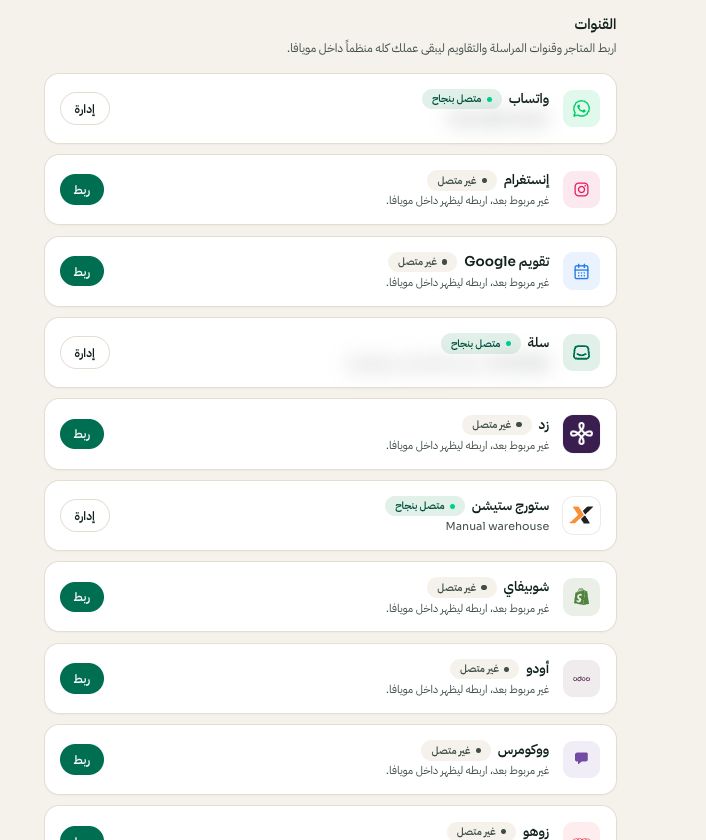
الإعدادات ← القنوات: اختر المنصة ثم ربط أو إدارة. قد تختلف الخيارات المتاحة والقيم المحفوظة حسب إعدادات حسابك. اضغط الصورة للتكبير. - 4
شرطان تتأكد منهما أولا
لازم متجرك يستخدم HTTPS، ولازم إعداد الروابط الدائمة ما يكون «Plain»، وإلا ما يستجيب REST API.
- 5
تأكد من المزامنة
الطلبات تظهر في «الطلبات» والمنتجات في «المنتجات» موسومة بشعار ووكومرس. أعد التزامن وقت ما تبي من الإعدادات ← ووكومرس.