اربط متجر شوبيفاي
ثبت التطبيق من متجر تطبيقات شوبيفاي، الطلبات والمنتجات والعملاء تتزامن لحظيا.
- 1
ثبت من متجر تطبيقات شوبيفاي
لأول ربط، ثبت مويافا من متجر تطبيقات شوبيفاي، شوبيفاي يتولى التفويض ويرجعك مباشرة.
- 2
وافق على الصلاحيات
وافق على صلاحيات مويافا من شاشة التثبيت في شوبيفاي. رمز الوصول يتحفظ مشفرا.
- 3
إعادة الربط لاحقا
افتح الإعدادات ← شوبيفاي وافحص حالة الربط. إذا انقطع فاتبع خيار إعادة الربط أو التثبيت الظاهر؛ حذف التطبيق من شوبيفاي يتطلب تثبيته مجددا.
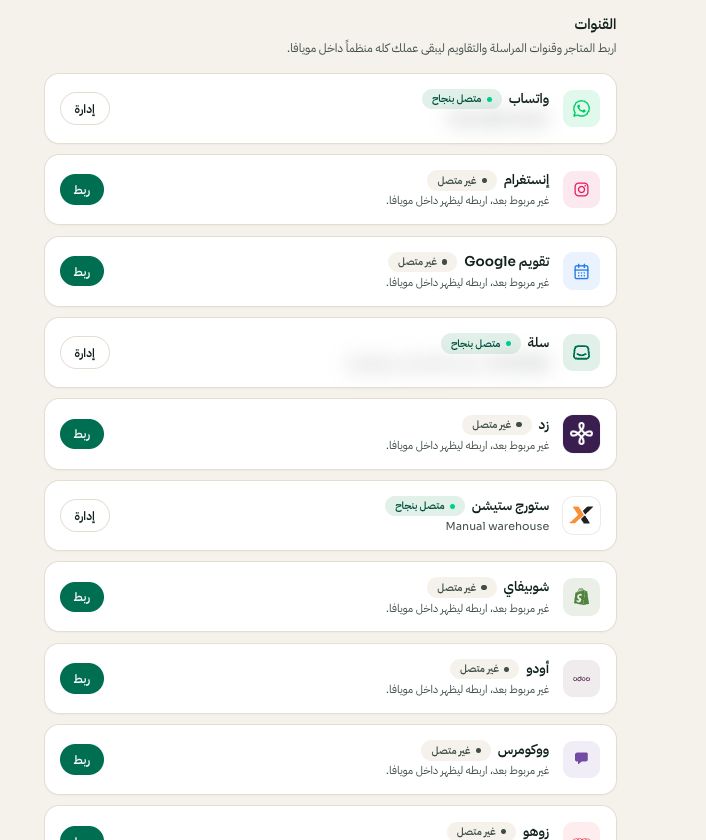
الإعدادات ← القنوات: اختر المنصة ثم ربط أو إدارة. قد تختلف الخيارات المتاحة والقيم المحفوظة حسب إعدادات حسابك. اضغط الصورة للتكبير. - 4
تأكد من المزامنة
الطلبات والمنتجات والعملاء تتزامن مع تحديثات لحظية عبر Webhooks. أعد التزامن وقت ما تبي من الإعدادات ← شوبيفاي.