اربط متجر سلة
اربط سلة عشان الطلبات والعملاء والمنتجات تتزامن مع مويافا.
- 1
افتح الإعدادات ← سلة
في مويافا، افتح الإعدادات ← سلة واستخدم خيار الربط الظاهر ثم أكمل التثبيت والتفويض في سلة. تحتاج صلاحية إدارة الإعدادات.
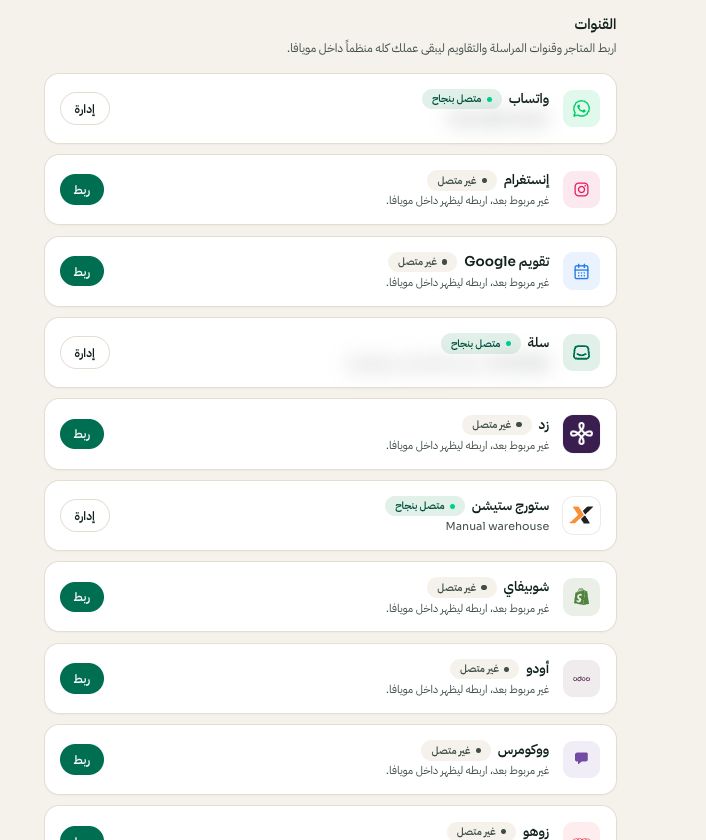
الإعدادات ← القنوات: اختر المنصة ثم ربط أو إدارة. قد تختلف الخيارات المتاحة والقيم المحفوظة حسب إعدادات حسابك. اضغط الصورة للتكبير. - 2
صرح في سلة
تنتقل لشاشة التصريح في سلة. سجل دخولك إذا لزم ووافق على مويافا. ترجع تلقائيا ويتحفظ الوصول مشفرا.
- 3
تأكد من المزامنة
الطلبات تظهر في «الطلبات» والمنتجات في «المنتجات». يحدث مويافا بيانات متجر سلة المتصل تلقائيا في الخلفية: يراجع الطلبات الحديثة دوريا، ويحدث المنتجات والمخزون، ويراجع سجل الطلبات الأقدم بشكل منفصل. تحمل المتاجر الكبيرة على دفعات، لذلك التحديثات ليست لحظية. إذا أكد سلة حذف منتج، يزال من كتالوج مويافا مع الاحتفاظ بالطلبات السابقة. تقدر أيضا تعيد المزامنة من الإعدادات ← سلة. إذا انقطع الربط فاتبع خيار إعادة الربط أو التثبيت الظاهر لحسابك.