اربط نظام أودو
اربط أودو بالرابط واسم قاعدة البيانات والمستخدم ومفتاح API.
- 1
أنشئ مفتاح API في أودو
تحقق من دعم إصدار أودو واشتراكه للوصول الخارجي عبر API. افتح ملفك أو تفضيلاتك وأمان الحساب لإنشاء مفتاح؛ تختلف المسميات حسب الإصدار. سمه «Moyafa» وانسخ المفتاح، يظهر مرة وحدة بس.
- 2
أدخل بيانات أودو
في مويافا، افتح الإعدادات ← أودو. أدخل رابط النظام (مثل https://yourco.odoo.com، واحذف مسار /odoo)، واسم قاعدة البيانات (النطاق الفرعي في Odoo Online، مثل yourco)، وبريد الدخول، ومفتاح API. اضغط «ربط أودو»، نتحقق قبل الحفظ ونخزن المفتاح مشفرا.
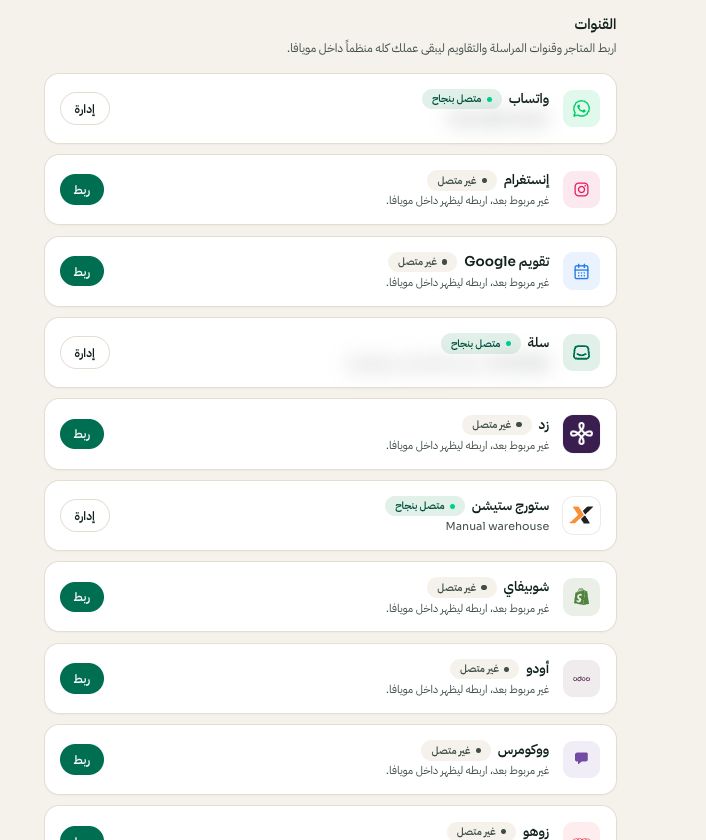
الإعدادات ← القنوات: اختر المنصة ثم ربط أو إدارة. قد تختلف الخيارات المتاحة والقيم المحفوظة حسب إعدادات حسابك. اضغط الصورة للتكبير. - 3
تأكد من المزامنة
الطلبات والمنتجات تتزامن في مويافا وموسومة بشعار أودو. أعد التزامن وقت ما تبي من الإعدادات ← أودو.