Configure return and exchange messages
Map approval, pickup, refund and replacement events to your approved Utility templates.
- 1
Create and submit a Utility template
Open Message templates → Return & exchange messages. Use Create and submit a template, then wait for Meta approval and refresh the library. Only approved Utility templates compatible with the supported values can be selected. Approval is separate from choosing a trigger.
- 2
Choose the event and request type
Choose the actual event from the list, then all requests or the specific refund/exchange type. A specific rule overrides the general rule; mixed requests use the general rule. Configure only events you intend to notify customers about.
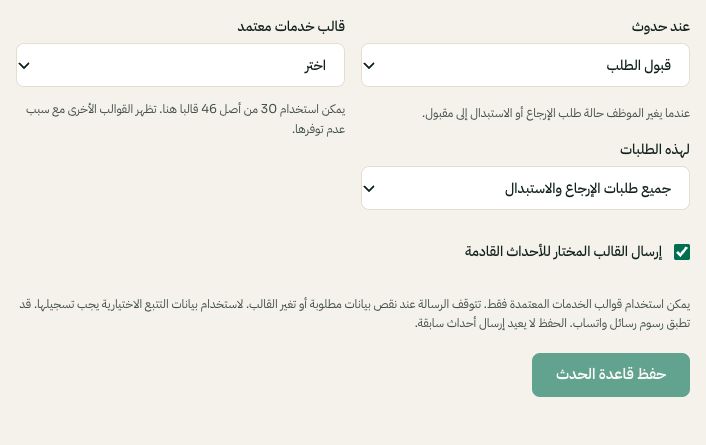
Choose the return event, request type and approved Utility template. Arabic interface shown; use the corresponding labels in your chosen language. Your available options and saved values may differ. Open the image to enlarge. - 3
Review variables and save
Select the template and language, map the required values and read the customer preview. Enable the rule for future events, then save. Missing required data or a changed template can block sending. Tracking values must be recorded on the case before they can be used.
- 4
Keep existing behavior in mind
Events without a saved rule keep their current behavior, including existing managed integrations. Standard updates may still send within the active WhatsApp window. Saving never resends past events. Review a controlled case and its message log before rolling out new rules.