Connect Instagram and reply to messages
Authorize your business account, verify inbound messages and manage replies from the shared inbox.
- 1
Open the Instagram connection
In Settings → Instagram, use the connection option shown for your workspace. Sign in with the account authorized to manage the business and select the intended Instagram account in Meta's flow. Resolve missing permissions in the provider flow before continuing.
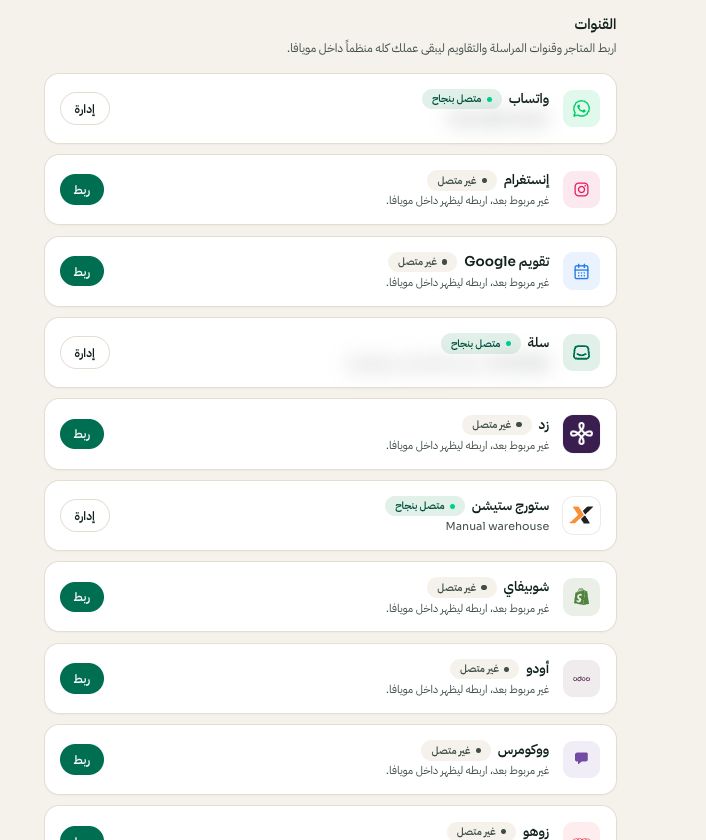
Settings → Channels: choose the platform, then Connect or Manage. Arabic interface shown; use the corresponding labels in your chosen language. Your available options and saved values may differ. Open the image to enlarge. - 2
Test receiving and replying
Send a test direct message from an account you control and open the Instagram conversation in Moyafa Inbox. Reply there and verify arrival on the test account. Sending limits and supported attachments differ by channel; follow the composer state instead of applying WhatsApp template rules to Instagram.
- 3
Review AI channel settings
Enable Instagram in the assistant's channel rules only if the option is available and you intend automatic replies there. Human takeover and topic rules still apply. If incoming messages stop, check connection health and reauthorization rather than creating a duplicate workspace.