API access and additional integrations
Find connection guides and safely configure the integration controls available to your workspace.
- 1
Use the dedicated connector first
Use the Salla, Zid, Shopify or warehouse guide for those integrations. An API key is not a substitute for connecting the store. Odoo, WooCommerce, Zoho and other services have their own account requirements and availability; check the visible connection screen before planning a live rollout.
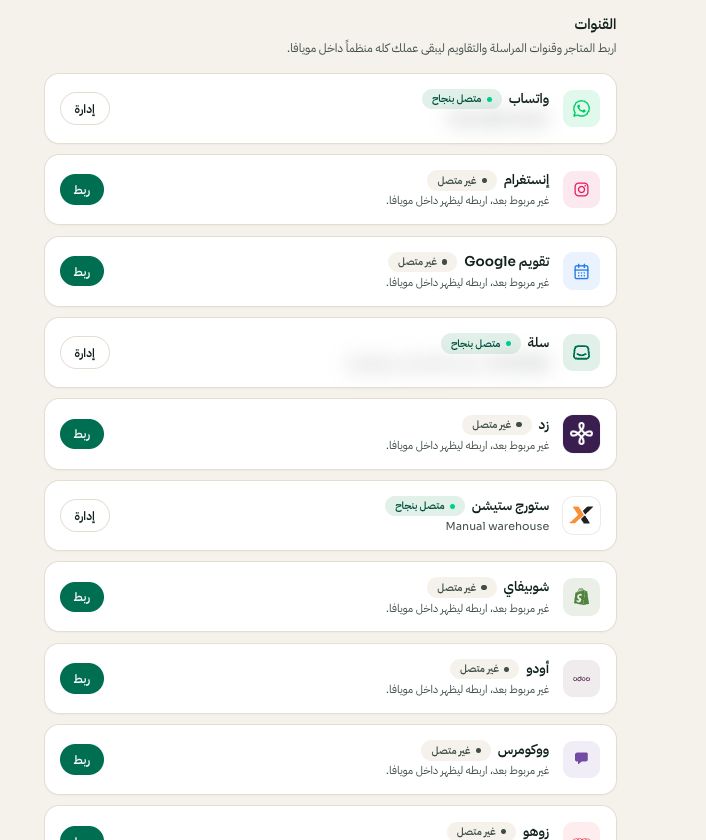
Settings → Channels: choose the platform, then Connect or Manage. Arabic interface shown; use the corresponding labels in your chosen language. Your available options and saved values may differ. Open the image to enlarge. - 2
Review API access with your developer
An authorized owner can open Settings → API access, review the available key controls and share a key only with the intended integration through a secure channel. Keep keys out of public guides, screenshots and customer messages. Ask Moyafa about the supported API operations before building against an assumed endpoint.
- 3
Check availability and test the result
Outbound webhook controls are available only to enabled workspaces. Confirm the receiving service and intended data before activation. A successful connection check does not prove every operation is configured: verify the specific order, product, event or message you need. Contact support if a connector is unavailable.